
Appearance
Shopify App: Adaptive Discovery
The Adaptive Discovery app block adds a continuous, personalized feed of Products and Content to a Shopify theme. Relewise loads more items as the shopper scrolls and uses their interactions to adapt the feed.
For the underlying concepts, tracking signals, and Feed Recommendation API, see Adaptive Discovery.
Add the Adaptive Discovery app block
Before adding the block, install and configure the Relewise Shopify app and activate the Relewise UI components.
- In Shopify admin, go to Online Store > Themes.
- Select Customize for the theme you want to edit.
- Open the page template where the feed should appear.
- Add an Apps section if the template does not already contain one.
- Select Add block, then select Adaptive Discovery.
- Configure the feed and select Save.
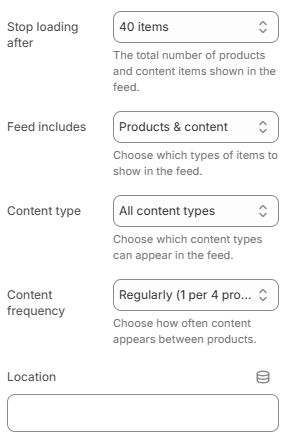
Adaptive Discovery app-block settings in the Shopify theme editor.
App-block settings
| Setting | Description |
|---|---|
| Stop loading after | Limits the total number of Products and Content items rendered in the feed. Choose 20, 40, 80, 120, or 200 items. The default is 40. |
| Feed includes | Choose Products & content, Products only, or Content only. |
| Content type | Choose all Content types, Blog posts, or Pages. This setting is available whenever the feed includes Content. |
| Content frequency | Controls how often Content appears between Products: occasionally is one Content item per eight Products, regularly is one per four, and frequently is one per two. This setting is available only when the feed includes both Products and Content. |
| Location | Identifies where the feed is displayed. Use a clear, stable value so requests and tracking can be identified in Relewise. |
On Product pages, the block uses the current Product as a seed when the app can resolve its Product ID. The block uses the fixed target adaptive-discovery, so add only one Adaptive Discovery app block to a page.
The standard block uses the built-in Product and Content tiles. Feed clicks, item visibility, and dwell are handled by the Adaptive Discovery Web Component.
Custom implementation
Use the fixed adaptive-discovery target when the app-block settings do not cover the logic or layout you need. The Shopify app exposes RelewiseWebComponents globally, so custom theme JavaScript can register another configuration for the same target.
Registering the same target replaces the app block's target configuration. The custom registration must therefore specify the minimum page size, compositions, and any limits or templates it needs. Ensure the custom script runs after the app block registers its standard configuration; the last registration for adaptive-discovery is used. One option is to place the script in a Custom Liquid block immediately after the Adaptive Discovery app block.
The following focused example creates a Content-only feed, filters Content using a custom EditorialTheme data key, and renders the named composition with a custom template:
html
<script>
  document.addEventListener('DOMContentLoaded', () => {
    RelewiseWebComponents.registerAdaptiveDiscoveryTarget('adaptive-discovery', {
      minimumPageSize: 1,
      maximumItems: 40,
      configure(builder) {
        builder.addComposition({
          options: {
            type: 'Content',
            name: 'inspiration-content',
            count: {
              lowerBoundInclusive: 1,
              upperBoundInclusive: 1,
            },
          },
          settingsBuilder(compositionBuilder) {
            compositionBuilder.filters(filterBuilder => {
              filterBuilder.addContentDataFilter(
                'EditorialTheme',
                conditionBuilder => conditionBuilder.addEqualsCondition('Inspiration'),
              );
            });
          },
        });
      },
      compositionTemplates: {
        'inspiration-content': (composition, { html, helpers }) => html`
          <section class="inspiration-feed">
            ${composition.content?.map(content => html`
              <a
                href=${content.data?.Url?.value ?? ''}
                ${helpers.trackContentVisibility(content)}
                @click=${() => helpers.trackContentClick(content)}>
                <h2>${content.displayName}</h2>
              </a>
            `)}
          </section>
        `,
      },
    });
  });
</script>
Add custom composition templates
Set options.name on a composition and add a function with the same key to compositionTemplates. A named composition without a matching template falls back to the built-in Product and Content tiles.
Each template receives the complete composition result and:
html: Lit's tagged template function.helpers.formatPrice: Formats prices using the current Shopify language and currency.helpers.stripHtmlClientSide: Removes HTML from a string before rendering it as text.helpers.nothing: Omits optional template output.helpers.user: Provides the current Relewise User.helpers.trackProductClickandhelpers.trackContentClick: Preserve FeedClick tracking for custom links and controls.helpers.trackProductVisibilityandhelpers.trackContentVisibility: Register custom items for dwell tracking.
Use the matching click and visibility helpers whenever custom markup represents a Product or Content item. Without them, the custom template renders, but those interactions do not contribute the expected Adaptive Discovery tracking signals.