
Appearance
Adaptive Discovery
Adaptive Discovery is Relewise's feed-based recommendation experience. It delivers a continuous, personalized stream of products and content that updates as shoppers interact.
Experience overview
Adaptive Discovery replaces isolated recommendation widgets with an endless feed that learns from behavior in real time. The result is a discovery surface that feels closer to social feeds, but tuned for commerce.
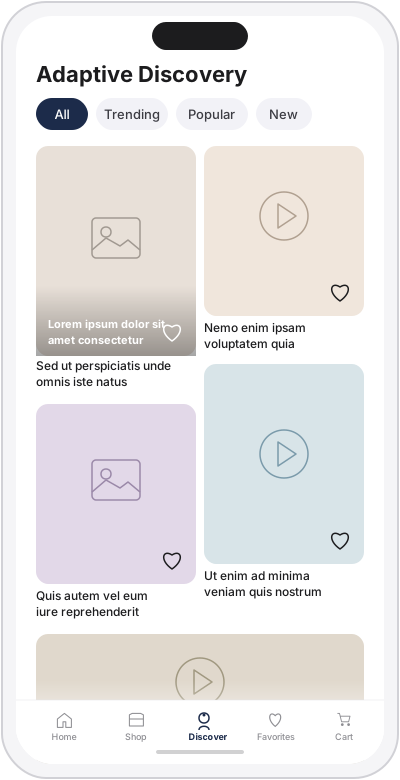
Illustrative mockup of Adaptive Discovery shown on a mobile device. The feature itself is not limited to mobile and can be implemented across storefront experiences.
This visual highlights the core idea behind Adaptive Discovery: a continuous experience that mixes Products and Content, responds to shopper interactions, and feeds those signals back into personalization over time.
Key value
- Drives longer sessions through continuous, relevant content.
- Captures high-quality intent signals beyond clicks.
- Enables reuse of engagement data across Search and Recommendations.
- Maintains merchandising control while staying personalized.
Core concepts
Feed sessions and continuation
The feed starts with an initialization request and continues with a continuation token. This keeps the scrolling experience stable and allows results to adapt as the session progresses.
Mixed entities
Each feed response returns an ordered list where every item is either a Product or Content entity. The mix ratio is controlled by request preferences, with room for future algorithmic tuning.
Engagement-driven learning
Adaptive Discovery learns from new signals that capture attention and preference. These complement existing behavioral tracking and enrich the user profile in the same Relewise APIs you already use.
Merchandising and control
Ranking can be influenced through merchandising and request-level parameters, so discovery stays aligned with business goals.
Tracking signals
Adaptive Discovery introduces new events alongside existing behavioral tracking:
FeedDwell: Indicates time spent viewing feed items. See Dwell tracking guidelines.FeedPreview: Captures preview interactions when your UI supports previewing items.FeedClick: Indicates a click on a feed item.FeedFeedback: Captures likes, dislikes, and favorites using the User Engagement model.
These signals can be used immediately for personalization and reporting.
Reporting and measurement
Feed exposure and downstream purchases are reported in My Relewise using existing analytics dashboards. This connects feed performance to revenue outcomes without introducing a separate reporting stack.
Implementation outline
The demo shop uses the Feed Recommendation API and updated tracking events. See the Relewise Demo Shop for the full storefront context. These are the exact calls used:
Initialize the feed
The first request creates the feed session, returns the first results, and yields an initializedFeedId for continuation.
ts
const builder = new FeedRecommendationInitializationBuilder(
    settings,
    { minimumPageSize: 20 }
)
    .setSelectedContentProperties(selectedContentProperties)
    .setSelectedProductProperties(selectedProductProperties)
    .allowProductsCurrentlyInCart()
    .addComposition({
        options: {
            type: 'Product',
            count: { lowerBoundInclusive: 1, upperBoundInclusive: 1 },
        },
    })
    .addComposition({
        options: {
            type: 'Content',
            count: { lowerBoundInclusive: 1, upperBoundInclusive: 1 },
        },
    });

const response = await recommender.recommendFeedInitialization(builder.build());
const feedId = response?.initializedFeedId;
const results = response?.recommendations ?? [];
Load more items
Continuation requests use the initializedFeedId from the initialization response.
ts
const builder = new FeedRecommendationNextItemsBuilder({ initializedFeedId: feedId });
const response = await recommender.recommendFeedNextItems(builder.build());
const results = response?.recommendations ?? [];
Track clicks
Feed item clicks are tracked with trackFeedItemClick.
ts
const item = type === 'Product'
    ? { productAndVariantId: { productId: id } }
    : { contentId: id };

tracker.trackFeedItemClick({ user, feedId, item });
Track dwell
Dwell tracking is sent as a batch using trackFeedDwell with visible items and an aggregated dwell time window. See the Dwell tracking guidelines before implementing.
ts
tracker.trackFeedDwell({
    user,
    feedId,
    visibleItems: [
        { productAndVariantId: { productId: '...' } },
        { contentId: '...' },
    ],
    dwellTimeMilliseconds: 2500,
});
These calls are used alongside existing behavioral tracking and User Engagement to personalize the feed and report performance.
Implementation guidelines
Dwell tracking
Dwell tracking should prioritize accuracy over volume. It is a weaker signal than a click, but still valuable when a shopper shows interest without selecting an item. A recommended starting point:
- Do not send dwell events until the shopper has scrolled at least once.
- Start or reset the dwell timer every time new items enter the viewport.
- Only send dwell events when scrolling resumes, not when the user leaves the screen.
- Include only items that were at least 90% visible during the dwell window.
- Suggested thresholds: 2000 ms on list-style feeds, 1500 ms on detail-style feeds.