
Appearance
Value Conditions
Value conditions help specify how and when an operator, such as a filter or a merchandising rule, takes effect.
Relewise operates with the following value conditions:
- EqualsCondition
- LessThanCondition
- GreaterThanCondition
- ContainsCondition
- DistinctCondition
- RelativeDateTimeCondition
- HasValueCondition
EqualsCondition
The Equals Condition looks for an exact match within a datakey. This is typically used for Boolean operators, where the condition must be either true or false.
Use case Example
json
{
  "$type": "Relewise.Client.Requests.Filters.ProductDataFilter, Relewise.Client",
  "Key": "InStock",
  "FilterOutIfKeyIsNotFound": true,
  "MustMatchAllConditions": true,
  "Conditions": {
    "Items": [
      {
        "$type": "Relewise.Client.Requests.Conditions.EqualsCondition, Relewise.Client",
        "Value": {
          "Type": "Boolean",
          "Value": true,
          "IsCollection": false
        },
        "TypeName": "EqualsCondition",
        "Negated": false
      }
    ]
  },
  "TypeName": "ProductDataFilter",
  "Negated": false
}
This filter specifies that the datakey `Instock` must Equal `true`.
LessThanCondition
The Less Than Condition specifies that a Double value must be less than the specified value. This cannot be used with non-Double datakeys, as the Value Condition looks for a numerical value to test against.
Use case Example
json
{
  "$type": "Relewise.Client.Requests.Filters.ProductDataFilter, Relewise.Client",
  "Key": "stockCount",
  "FilterOutIfKeyIsNotFound": true,
  "MustMatchAllConditions": true,
  "Conditions": {
    "Items": [
      {
        "$type": "Relewise.Client.Requests.Conditions.LessThanCondition, Relewise.Client",
        "Value": 5.0,
        "TypeName": "LessThanCondition",
        "Negated": false
      }
    ]
  },
  "TypeName": "ProductDataFilter",
  "Negated": false
}
This filter specifies that the value of the `stockCount` datakey must be less than `5`.
GreaterThanCondition
The Greater Than Condition specifies that a Double value must be Greater than the specified value. This cannot be used with non-Double datakeys, as the Value Condition looks for a numerical value to test against.
Use case Example
json
{
  "$type": "Relewise.Client.Requests.Filters.ProductDataFilter, Relewise.Client",
  "Key": "stockCount",
  "FilterOutIfKeyIsNotFound": true,
  "MustMatchAllConditions": true,
  "Conditions": {
    "Items": [
      {
        "$type": "Relewise.Client.Requests.Conditions.GreaterThanCondition, Relewise.Client",
        "Value": 5.0,
        "TypeName": "GreaterThanCondition",
        "Negated": false
      }
    ]
  },
  "TypeName": "ProductDataFilter",
  "Negated": false
}
This filter specifies that the value of the `stockCount` datakey must be greater than `5`.
ContainsCondition
The Contains Condition checks whether the specified value occurs in a Data Key. It supports String data, StringList data, multilingual data, and Double data.
For String data with a String filter Value, the condition checks for a substring. For StringList data, it checks for complete list elements: denim matches an element equal to denim, but does not match an element equal to dark denim. A single String filter Value can be used against StringList data.
For a non-negated condition with StringList data and a nonempty StringList Value, ValueCollectionEvaluationMode determines which requested values must be present:
All: Every value in the condition'sValuemust be present in the stored list.Any: At least one value in the condition'sValuemust be present in the stored list.
The setting applies to the values supplied in the condition's Value. With one requested value, All and Any give the same result.
The following examples use Negated: false:
Stored Tags | Condition Value | All | Any |
|---|---|---|---|
[] | ["denim"] | No match | No match |
["denim"] | ["denim"] | Match | Match |
["denim", "cotton"] | ["denim"] | Match | Match |
["cotton"] | ["denim"] | No match | No match |
["denim"] | ["denim", "cotton"] | No match | Match |
An existing Data Key with an empty list does not match a non-negated ContainsCondition with a nonempty filter Value. FilterOutIfKeyIsNotFound controls what happens when the Data Key is missing; an existing empty list is evaluated by the condition. See DataFilter for the filter settings.
Use case Example
json
{
  "$type": "Relewise.Client.Requests.Filters.ProductDataFilter, Relewise.Client",
  "Key": "tags",
  "FilterOutIfKeyIsNotFound": true,
  "MustMatchAllConditions": true,
  "Conditions": {
    "Items": [
      {
        "$type": "Relewise.Client.Requests.Conditions.ContainsCondition, Relewise.Client",
        "Value": {
          "Type": "String",
          "Value": "denim",
          "IsCollection": false
        },
        "ValueCollectionEvaluationMode": "All",
        "TypeName": "ContainsCondition",
        "Negated": false
      }
    ]
  },
  "TypeName": "ProductDataFilter",
  "Negated": false
}
This filter specifies that the datakey `tags` must contain the string `denim`.
DistinctCondition
The Distinct Condition specifies that the value of a datakey can only be present a certain amount of times in the request response. This can be used to ensure that a response is varied between product or variant types; for instance, it can be used to ensure that a search request for dresses only returns a few of the same color or material, to diversify the results.
This condition only takes one setting, NumberOfOccurrencesAllowedWithTheSameValue. This is the number of times a given value is allowed to exist within the datakey specified in the filter.
Use case Example
json
{
  "$type": "Relewise.Client.Requests.Filters.ProductDataFilter, Relewise.Client",
  "Key": "color",
  "FilterOutIfKeyIsNotFound": true,
  "MustMatchAllConditions": true,
  "Conditions": {
    "Items": [
      {
        "$type": "Relewise.Client.Requests.Conditions.DistinctCondition, Relewise.Client",
        "NumberOfOccurrencesAllowedWithTheSameValue": 1,
        "TypeName": "DistinctCondition",
        "Negated": false
      }
    ]
  },
  "TypeName": "ProductDataFilter",
  "Negated": false
}
This filter specifies that any given value for the datakey `color` on products returned in the request, may only occur once.
This means, for instance, that only one occurrence of `red`, `blue`, or `green` is permitted.
RelativeDateTimeCondition
The Relative Date Time Condition looks at a double data value (that should be formatted as a 🔗unix timestamp), and compares it with the current date and time according to the specifications of the condition. This can be used to, for instance, boost a product that has been created recently to increase its visibility in search and recommendation results.
This condition takes several configurations: Timestamp Unit, Comparison, Direction, and Duration/Duration Unit
Unit
Denotes whether the Unix timestamp in your Data Key uses UnixMilliseconds, UnixSeconds, or UnixMinutes.
Comparison
This specifies if the Relative Date Time condition should compare the datakey to Earlier Than or Later Than the Direction.
Direction
This specifies the baseline for comparison; Now, Ago, or From Now. Used together with Comparison to identify what way in time the filter should apply.
Duration/Duration Unit
Used with the Directions Ago and From Now to specify the relative time period used for comparison. Can be set to Miliseconds, Seconds, Minutes, Hours, or Days.
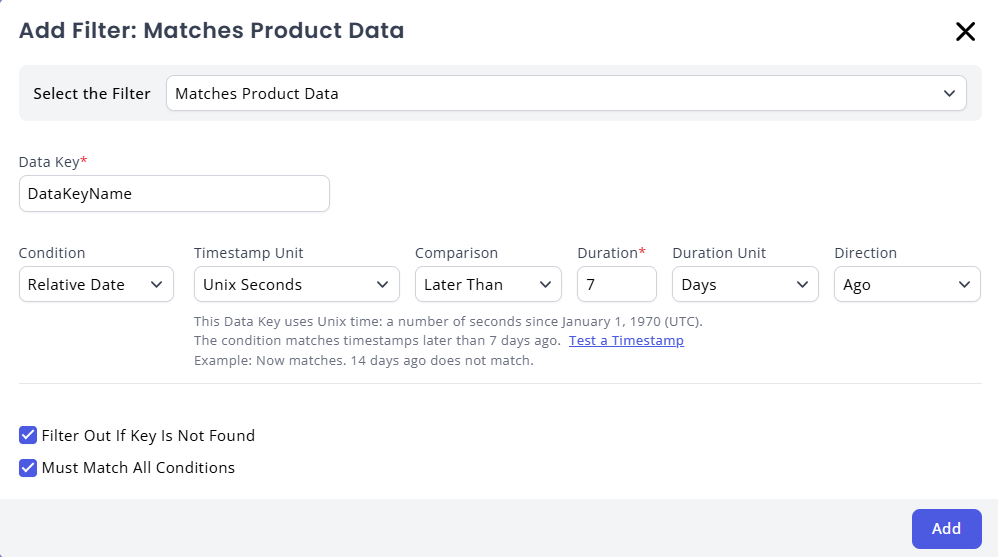
An example of a Relative Date condition in use in a Merchandising Rule.
Use case Example
json
{
  "$type": "Relewise.Client.Requests.Filters.ProductDataFilter, Relewise.Client",
  "Key": "createdDate",
  "FilterOutIfKeyIsNotFound": true,
  "MustMatchAllConditions": true,
  "Conditions": {
    "Items": [
      {
        "$type": "Relewise.Client.Requests.Conditions.RelativeDateTimeCondition, Relewise.Client",
        "Comparison": "After",
        "Unit": "UnixSeconds",
        "CurrentTimeOffset": -604800,
        "TypeName": "RelativeDateTimeCondition",
        "Negated": false
      }
    ]
  },
  "TypeName": "ProductDataFilter",
  "Negated": false
}
This filter specifies that products must have a `createdDate` timestamp that is 7 days old or less.
HasValueCondition
This condition checks if a datakey has a value at all. A datakey is considered to have no value if one or more of the following conditions is met:
- The value is null
- The value is a list but the list is empty
- The value is a DataObject but the object is empty
Use case Example
json
{
  "$type": "Relewise.Client.Requests.Filters.ProductDataFilter, Relewise.Client",
  "Key": "stockCount",
  "FilterOutIfKeyIsNotFound": true,
  "MustMatchAllConditions": true,
  "Conditions": {
    "Items": [
      {
        "$type": "Relewise.Client.Requests.Conditions.HasValueCondition, Relewise.Client",
        "TypeName": "HasValueCondition",
        "Negated": false
      }
    ]
  },
  "TypeName": "ProductDataFilter",
  "Negated": false
}
This filter specifies that products must have a given value for the datakey `stockCount`.